Manage Filters
Managing Filters include:
- Activate or Deactivate a Filter
- Edit a Filter
Activate or Deactivate a Filter
When you log on to Fraud Protection Advanced for the first time, all filters remain unselected (disabled). If a filter is disabled, even if a transaction satisfies the filter condition, it passes through.
To activate a filter:
- Open the filters list. The filters list is displayed in the tabular format.
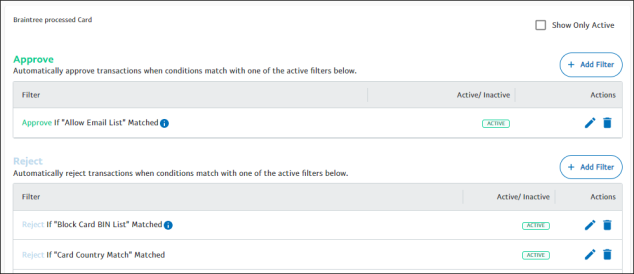
- In the Actions column, click the edit icon against the filter you want to enable. The Edit Filter dialog box appears.
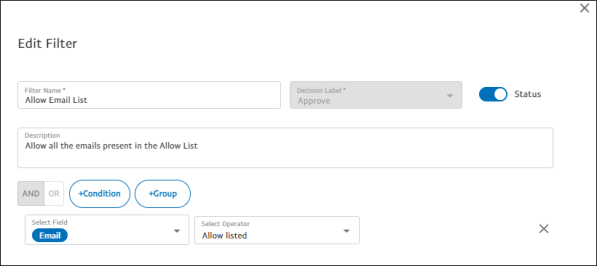
- Enable the Status toggle to activate the filter.
- Click Test to test the performance after enabling the filter. For more information, see Filter Simulations.
To deactivate a filter:
- Open the filters list. The filters list is displayed in the tabular format.
- In the Actions column, click the edit icon against the filter you want to disable. The Edit Filter dialog box appears.
- Disable the Status toggle to deactivate the filter.
- Click Test to test the performance after disabling the filter. For more information, see Filter Simulations.
- Click Save to take the changes effect.
Edit a Filter
Editing a filter involves making changes to the existing conditions, adding new conditions, or removing the conditions to improve the overall performance. After you make necessary changes, you can test the filter to see a forecast of the performance with respect to the modifications done to it.
To edit a filter:
- Open the filters list. The filters list is displayed in the tabular format.
- Click the edit icon against the filter name you want to edit. The Edit Filter dialog box appears.
- Make the necessary changes in the filter.
Note: The maximum character length for filter name is 55 characters and the maximum character length for filter description is 255 characters.
- After editing a filter, click Test. For more information on testing the filter to see a forecast of the performance with respect to the modifications, see Filter Simulations.